Canva Orchestration Studio
AI Workflow as a First-Class Team Artifact
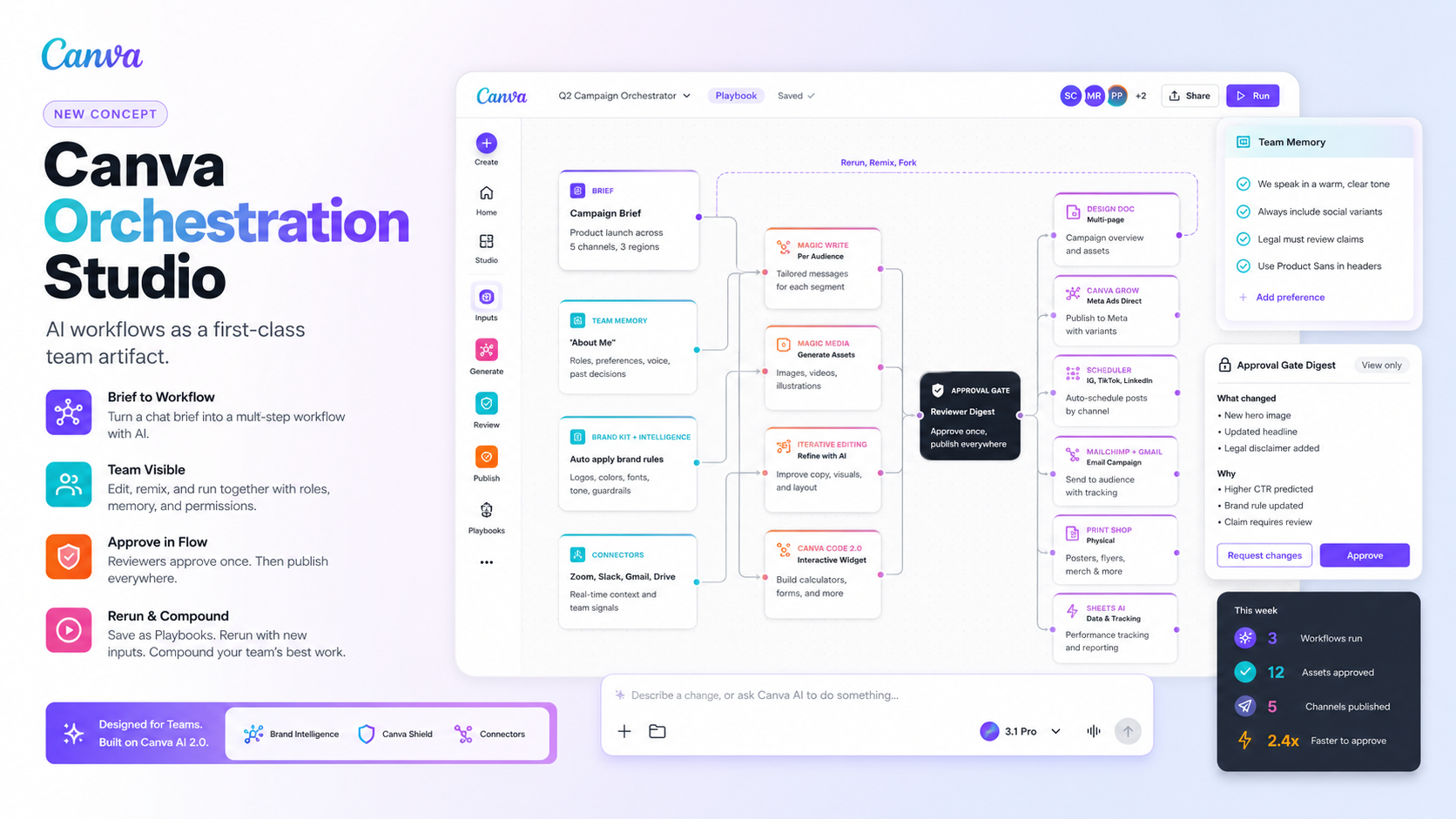
A concept product built in the days after Canva Create 2026. Canva AI 2.0 made creation conversational; this proposes the next unlock for Teams: turning the workflow itself into a saveable, rerunnable, governable artifact. Includes a full strategy doc, PRD, deck, and a live interactive prototype that converts a brief into a multi-node, multi-channel campaign graph with brand enforcement and an in-flow Approval Gate.
This project explores a focused product bet for Canva in the post Create 2026 world. If creation has been collapsed into a chat box, the next thing that needs to collapse is the team workflow that runs around the chat box.
It is structured the way I would treat a real product initiative inside Canva: a thesis, a strategy doc, a PRD, a deck, and a working interactive prototype that demonstrates the core interaction end to end. The full prototype is live at canva-concept.tharunpoduru.com.
Why This Project Exists
Canva Create 2026 shipped roughly seventy launches in a single keynote and repositioned the company from a design platform with AI tools into an AI platform with design tools. Canva AI 2.0, Agentic Orchestration, the Memory Library, Connectors, Canva Grow, Canva Code 2.0, Canva Shield, and the new tokenized AI economy together reset what a single prompter can do inside Canva. I wrote a full breakdown of the keynote and what it means for product teams here: Canva Create 2026 in Review.
The creation surface is now extraordinary for one person. The question I wanted to answer was different. What is the next defensible problem to solve once a single user can already generate a multi-channel campaign from a chat box?
After studying the keynote, reading through r/canva, Gartner Peer Insights, Capterra, G2, and Canva's own help docs, the pattern was consistent. Canva 2.0 closes the creation-side complaints. The complaints that survive are about the team. Handoff, review, governance, reuse, and the gap between what one person can prompt and what an organization can repeatedly ship.
That gap was the opening worth chasing.
The Core Insight
Chat is great at capturing intent. Teams at scale need visible process control.
Canva AI 2.0 lives in a session. Agentic Orchestration tweaks layouts on the fly. The Memory Library remembers "About Me." Each of those is excellent for the prompter in front of the chat box. None of them is the team's.
For a marketing team running weekly promos across five channels and three locales, the part that needs to be durable is not the asset. It is the recipe that produced the asset. The brief. The brand rules. The approval. The publish steps. The decision to swap a TikTok variant for a LinkedIn one. Today that recipe lives in one person's chat thread, gets rebuilt from scratch every Monday, and never compounds across the team.
If Canva makes the workflow itself a saveable, editable, rerunnable artifact, the team starts to compound. Great prompts become team infrastructure. Reviewers stop chasing tabs. Brand owners stop spot-checking outputs after the fact. Regional marketers stop guessing what is fixed and what is flexible.
That insight became the foundation for the product strategy that follows.
The Product Strategy: Canva Orchestration Studio
Canva Orchestration Studio is a visual workflow layer that sits on top of Canva AI 2.0, Connectors, Brand Intelligence, and Canva Shield. Users start the same way they already do, with a chat brief, and Canva AI proposes a draft workflow graph the team can see, edit, and rerun.
Every node in the graph is a real Canva surface, not a generic automation step:
- Input nodes. Conversational Brief, File Upload, Web Research.
- Context nodes. Team Memory, Brand Kit + Brand Intelligence, Connectors (Zoom, Slack, Gmail, Drive).
- Generation nodes. Magic Write per audience, Magic Media, Iterative Agentic Editing, Canva Code 2.0, Sheets AI.
- Review node. An in-flow Approval Gate with a per-node reviewer digest.
- Output nodes. DesignDoc, Canva Grow for Meta Ads, Scheduler for IG, TikTok, and LinkedIn, Mailchimp, Gmail, Print Shop.
Saved runs become Playbooks. Named, ownable, taggable workflow templates that any teammate can fork, remix, or rerun with new inputs. Each Playbook keeps its AI provenance, so a brand lead can audit why the agent picked a headline, not just what the headline was.
The positioning is deliberately additive, not competitive with anything Canva already ships. Canva AI 2.0 remains the brain. Canva Shield remains the policy layer. Orchestration Studio adds the durable, team-visible, governed layer on top. The part you can name, hand off, version, and rerun next Monday without rebuilding from a blank chat.
The Pitch
The full deck walks through the thesis in six slides plus an AI workflow appendix. It compresses the strategy doc into the version a Canva product review meeting would actually see.
Title and thesis
Three Team-Level Gaps That Canva 2.0 Does Not Close
The strategy doc behind the project frames the opportunity as three Jobs To Be Done. Each one is a reason a team pays for a collaborative plan, and each one compounds across every seat, every location, and every campaign.
1. Stay on brand at scale. Brand-consistent organizations show a measurable revenue lift, and the average org runs on roughly nine visual tools simultaneously. Canva's Brand Intelligence enforces brand on a single AI draft. It does not make the workflow itself auditable, which is what franchise and multi-location teams actually need.
2. Approve once, publish everywhere. Canva's version history is linear and all-or-nothing. Approvals still live in Slack and email. Pre-2026, reviewers had to burn a full premium seat just to click approve. The reviewer digest that Teams genuinely need today does not exist anywhere in the product.
3. Compound AI across the team. Studies show a meaningful share of AI outputs still need significant edits, which means the prompt craft matters. But prompts live in private chat threads. Memory Library is explicitly per-user. Great prompts never propagate. Every Teams seat now carries the AI premium, which means the ROI has to land at the team level, not the individual level.
Orchestration Studio is the smallest coherent product that addresses all three at once.
What the Prototype Actually Does
To prove the idea is not just a slide, I built a working version with a real Canva-skinned UI, a real workflow canvas, real Gemini calls per node, and real persistence in Firestore. The full demo lives at canva-concept.tharunpoduru.com and walks through the end-to-end loop:
- Home. A Canva-skinned shell with the AI 2.0 entry point and a chat-to-workflow card.
- Chat to graph. A brief streams into Gemini and materializes a workflow on the canvas as nodes arrive. You watch the AI "think" rather than waiting for a finished result.
- Team Memory drawer. A shared layer of preferences, decisions, and brand facts that gets injected into every node. Toggling a preference causes the next run of that node to behave differently.
- Per-node execution. Each node streams its own typed output. Variant nodes call Nano Banana 2 for hero imagery; high-fidelity nodes can call Nano Banana Pro for typography-grade work.
- Approval Gate. A Send for approval action mints a tokenized public reviewer link. Reviewers see a natural-language digest of what changed and why, with no Canva seat required.
- Playbooks. The full graph can be saved as a Playbook and reopened with a new brief. Same recipe, different output.
- Edit with AI. A natural-language command like "add a TikTok variant and cut the legal review" returns a JSON patch from Gemini and updates the canvas in place.
A built-in deck inside the prototype walks a reviewer through the strategy in six slides plus an AI workflow appendix, so the prototype and the narrative live in the same place.
Tradeoffs and Deliberate Non-Goals
Orchestration Studio is shaped as much by what it intentionally does not do.
- Not a Zapier. Every node is anchored to a real Canva surface. There is no "post to a random REST endpoint" node. Generic automation is somebody else's market.
- Not a replacement for chat. Chat remains the fastest entry point. The workflow canvas is the durable, team-editable form of the same intent.
- Not a replacement for Canva Shield. Orchestration inherits the existing RBAC, identity, and policy stack. It does not redefine them.
- No open node SDK in v1. Custom nodes by third parties are a Phase 3 plus consideration. The MVP focuses on opinionated, branded-content motions.
- No advanced branching for every asset type. The MVP keeps the node set small and the graph readable. Power-user features wait until adoption is real.
These tradeoffs are what keep the product from drifting into generic workflow tooling and let it stay anchored to the highest-value Canva motion: branded content at scale.
How the Prototype Was Built
The prototype is a Next.js 16 App Router app with React 19, TypeScript, Tailwind, and Firebase App Hosting. The workflow canvas is built on React Flow (xyflow). State is split between Zustand stores for persona, workflow, memory, brand, and playbooks. TanStack Query handles server state.
The first version of the AI stack used Gemini 3.1 Flash and Gemini 3.1 Pro for text reasoning. After Canva Create 2026 and the corresponding Gemini release wave, I migrated all text generation to Gemini 3.5 Flash, which gave me better latency, better structured-output adherence, and a single coherent model across every node. Image generation stayed on the dedicated Nano Banana family.
| Moment | Model | Why |
|---|---|---|
| Chat to workflow graph | Gemini 3.5 Flash | Reasoning, multimodal, structured output |
| Per-node execution | Gemini 3.5 Flash | Fast, cheap, per-node |
| Variant hero image | Nano Banana 2 | Default image generation |
| Hero and premium imagery | Nano Banana Pro | High-fidelity typography |
| Workflow edit (JSON patch) | Gemini 3.5 Flash | Constrained JSON output |
| Reviewer digest | Gemini 3.5 Flash | Long-context summarization |
Every structured call uses responseMimeType: application/json with a responseSchema, every response is Zod-validated, and every failed call has a deterministic fallback so the demo never breaks. Streaming uses Server-Sent Events from Next.js App Router route handlers. When SSE is blocked, the runner falls back gracefully.
Multi-user without auth is solved through a persona switcher (Sarah, Marco, Priya, Exec), reviewer tokens for seatless approval, and a seeded activity feed that makes the workspace feel lived-in.
Success Metrics
The strategy intentionally measures workflow value, not AI activity.
North Star: WAOWR (Weekly Approved Orchestrated Workflow Runs). The number of runs per week that produce at least one approved branded output. It moves only when the workflow actually ships work, which makes it immune to vanity AI clicks. Pilot goal: 2× WAOWR in 90 days versus a Canva 2.0 baseline on matched teams.
Primary metrics, one per job:
- Time from brief to first approved asset. Baseline 8 to 12 hours, target under 4 hours.
- Review cycles per campaign. Baseline 3.2 average, target 1.0.
- Workflow reuse rate. Share of runs forked from a Playbook. Target +40 percentage points.
- Multi-user workflow edit rate in a 14-day window. Target +70 percentage points.
- Brand-rule adherence in outputs, auto-checked. Target 95 percent or higher.
Guardrails (AI dollars per approved run, asset-quality regression, and reviewer trust) keep the AI premium profitable and keep the product from quietly degrading.
Signals I deliberately skip: AI DAU, prompts per user, assets generated. They reward activity, not team outcomes. If WAOWR rises while those stay flat, the product is still winning.
Phased Ship Plan
Phase 1: Orchestrator Beta (8 to 10 weeks). Prove teams want a visible, rerunnable workflow on top of Canva AI 2.0. Ship chat-to-graph, a core node library, Approval Gate, Playbook save and rerun, and a gated preview with 20 to 30 Business teams. Teams: Product, Design, Frontend, AI Platform, User Research. Risk: drift into generic automation. Mitigation: anchor every node to a real Canva surface.
Phase 2: Team Governance (next quarter). Make workflows Enterprise-native. Role-based editing, scoped Brand sources, reviewer digest email, AI decision audit log, admin permissions aligned to Canva Shield. Phase 1 teams plus Security, Enterprise Success, Content Design, Legal. Risk: governance friction kills adoption. Mitigation: controls are modular and opt-in.
Phase 3: Scale and Optimize (following quarter). Turn Playbooks into a performance engine. Localization and market variants, workflow analytics, a recommendation layer, vertical packs for SaaS, retail, and franchise. Phase 2 teams plus Data Science, Growth, Sales, Partnerships. Risk: compute costs outrun pricing. Mitigation: the AI dollars per approved run guardrail is the trip-wire.
Why This Project Matters to Me
Most of the public AI conversation right now is about model capability. The interesting product work, the work I actually want to do, is one layer up, in the seams where a single prompter's output has to become a team's repeatable motion.
This concept is my best attempt at solving that for the company I think is uniquely positioned to do it. Canva already owns the design surface, the brand systems, the distribution, and now the AI orchestration stack. The piece that is still missing is the visible, governable, reusable workflow that lets a team compound on top of all of it.
The strategy doc, the PRD, the deck, and the working prototype were all built in roughly two weeks, with AI doing real work at every step. Not just generating copy, but proposing structure, drafting node logic, building UI, and stress-testing tradeoffs. The point is not that I built a product. The point is that this is what a Canva PM's working artifact looks like in a world where the model is part of the team.
If you want to go deeper, the full PRD is available alongside this page, and the live prototype is at canva-concept.tharunpoduru.com. For the broader context on what Canva Create 2026 actually shipped, see my full breakdown in Canva Create 2026 in Review.